基于Upstream-ToR网络的Kubernetes Windows Node配置
前言
Kubernetes 集群中 Windows 节点引入的成功与否主要决定于 Kubernetes 网络组件的成熟程度及 Windows Server 的 SDN 能力. Kubernetes 从 1.5 版本基于 Windows Server 2016(1607)开始引入 Windows 容器, 发展到目前的最新版本 1.18; Windows Server 也从 1607 经历了 1709/1803/1809/1903/1909 几个版本的发展, 在容器化支持及 SDN 方面也做了很多的功能改进
常用的 Kubernetes 集群网络组件有很多, 但能同时支持 Linux/Windows 混合集群的网络组件比较少(最起码之前是的), 之前搭建过基于 Windows Server 1709 和 OVS/OVN 网络的混合集群, 但由于 OVS 网络的基础组件太多(Open vSwitch, Central Database, Northbound Database, Southbound Database...), 安装配置过程较复杂并且难维护,加上 ovn-kubernetes 在当时还不太成熟, 试用了一段时间后放弃. 经过近两年的发展, Windows 容器环境已经能达到准生产环境的标准, 所以本文基于社区大神们提供的开源组件及相关文档,阐述基于 L3 Upstream ToR 网络模型的 Linux/Windows 混合集群的网络配置过程
本文目的
在不修改原有的 Kubernetes Linux 集群网络的基础上加入 Windows 节点, 实现 Windows/Linux 节点间的网络互通:
- Container to Container
- Pod to Pod
- Container to Service
- Pod to Service
关于 L3 Upstream ToR 首先引用官方一张图说明一下 upstream ToR 网络模型: 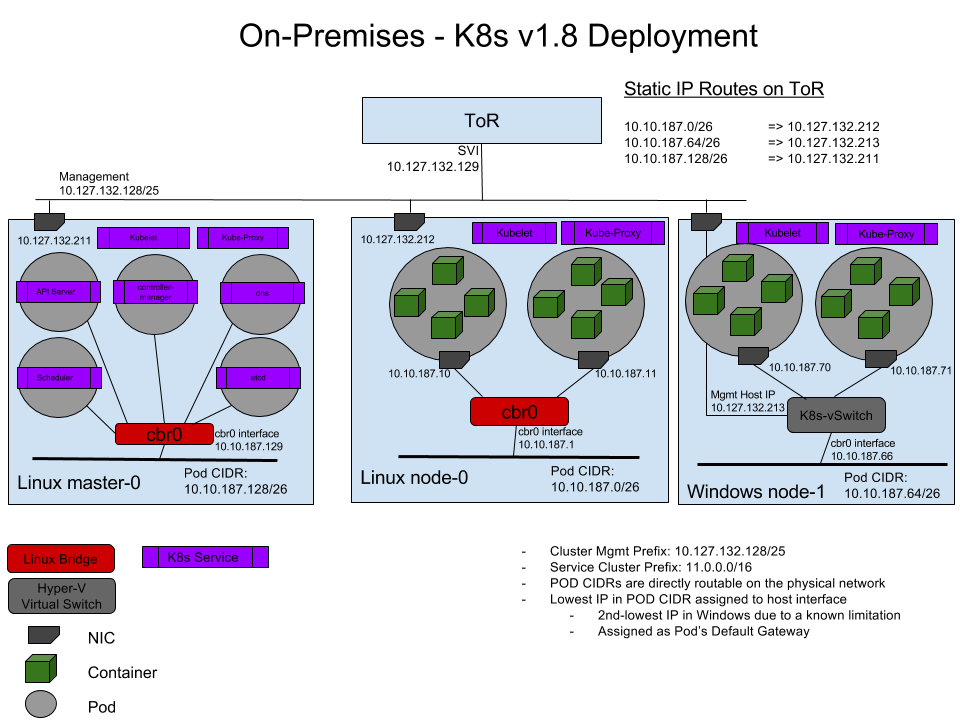
这张图来源于 Kubernetes 官网文档 - 在 Kubernetes 中使用 Windows Server 容器, 通过一个配置了静态路由的 ToR(Top of Rack)实现 Linux 节点容器与 Windows 节点 Pod 之间的互联互通.
知识结构
假设阅读者有如下知识基础:
- 了解基础网络概念: IP, CIDR, 网关, 路由, 桥接
- 了解 DOS 批处理及相关的一些网络操作, ipconfig, route 等
- 了解 Powershell 的基本使用
- 了解 bash/sh 及一些相关的网络操作, ip, ifconfig 等
- 了解 VIP, keepalived
- 了解 Docker, Container 的基本概念
- 了解容器网络的基本概念
- 了解 Windows SDN 网络的概念和操作, Hyper-V 的 vSwitch, Endpoint 等
- 了解 Kubernetes 的基本概念, Cluster Networking, Container, Deployment, Service
- ...
参考资料 基于以上假设及知识点, 本文参考了如下资料文档:
-
Windows 容器化文档主页: Containers on Windows Documentation
-
Windows 容器网络的基础概念: Windows container networking
-
Windows 容器网络的几种网络模式: Windows container network drivers, NAT/Transparent/Overlay/L2bridge/L2tunnel 等
-
L2brdige 网络模型的详解: L2bridge Container Networking
-
Windows 容器的两种隔离模式: Isolation Modes, Process 和 Hyper-V
-
Windows 容器在两种隔离模式下的 Host/Container 操作系统兼容性: Windows container version compatibility
-
Windows Server 1909 中开始提供的高效 Load Balancing 方案 - DSR: Direct Server Return (DSR) in a nutshell
-
来自David Schott的关于 Windows 网络问题的详尽 Troubleshooting: Troubleshooting Kubernetes Networking on Windows: Part 1, David Schott 在 github 上的 title 是 Microsoft 容器网络的 PM
-
来自倪朋飞/feiskyer 的(github - feiskyer, Twitter, Linkedin, Microsoft Azure 员工, Microsoft SDN/Kubernetes 相关的 Code Review 都有他, 坐标上海)的:
-
几个重要的 github 开源项目:
-
https://github.com/microsoft/SDN, Micrsoft SDN, Windows 容器化相关的 HNS 网络脚本, 节点初始化脚本都可以从该项目中获取
-
https://github.com/containernetworking/plugins, 提供了 CNI 网络插件, 后面使用至的 win-bridge 将从该项目下载
-
https://github.com/kubernetes-sigs/sig-windows-tools, 提供了 Windows 容器化及 Kubernetes Windows 环境部署的工具及脚本
-
Ian Lewis 的两篇文章关于 Pod 和 Pause Pod
一、准备环境
1.1、Kubernetes Cluster
添加 Windows 节点的前置条件是已经存在一个 Kubernetes 集群, 集群中有一个或多个 master 节点, 一个或多个 linux minion 节点. 集群中原来使用了 CNI 网络插件, 如 Calico, Flannel 等
以一个使用中的 Kubernetes 集群为例, 该集群的 Pod/Service CIDR 如下:
- Pod CIDR: 10.160.0.0/12
- Svc CIDR: 10.176.0.0/12 后续描述也以这个集群为例, 后称"该 K8s 集群".
1.2、Windows Node
安装了 Windows Server 2019 的 Windows 服务器, 要求发行版本号在 1803 以上, 推荐采用 1809(Build Number 10.0.17763).
Windows 新版本修复了容器化及 SDN 相关的一些 bug, 1909(10.0.18363)中提供了新特性 DSR 的支持, 但 1909 在 kube-proxy 运行在 Windows Service 模式时会有一些小问题, 需要修改 Windows Service 运行账户解决.
目前的最优选择为 1809(10.0.17763.*)
Windows 1803 以前版本跟 kube-proxy 相关的 bug 信息参考: https://github.com/kubernetes/kubernetes/issues/62029
二、配置步骤
配置过程会描述记录一些初始化的步骤, 这些在生产环境中是必要的, 但又不是实现 Linux/Windows 的混合集群的必须步骤, 会加上"可选"字样
2.1、Windows 节点基础配置
2.1.1、网络配置(可选)
残留配置清理 如果 Windows 节点之前被使用过, 为确保 Hyper-V SDN 中没有残留配置, 最好执行一次网络清理. 1709 和 1909 的 Windows 版本, 在 CMD shell 中执行 netcfg -d, 然后重启 Windows 节点,可完成网络配置复位, 所有网络适配器的 IP/DNS 配置会被清空, 需要控制台登录重新配置
实际使用中发现在 Windows Server version 1809(OS Build 17763.973)中执行 netcfg -d 并不能清除所有的虚拟网络适配器, 需要在注册表路径下删除:HKLM\SYSTEM\CurrentControlSet\Control\Network 中的相关项.
如果还清除不掉: 在 Powershell 中使用 Get-PnpDevice -class net | ? Status -eq Error | Select InstanceId 查询网络适配器, 然后根据 InstanceId 在 HKLM\SYSTEM\CurrentControlSet\Enum 删除 然后重启 Windows Node
IP/DNS 配置
为了提高 K8s 集群节点间通讯效率, 减少业务通讯数据对 Kubernetes 集群内部通讯的影响, 该 K8s 集群采用了双网络, 一块网卡用于连接办公网, 一块网卡用于连接 Kubernetes 节点内网.
其中:
- 办公网 CIDR: 172.16.126.0/24
- K8 内网 CIDR: 100.100.126.0/23
准备加入 Kubernetes 集群的 Windows 节点的两块网卡配置分别为:
- 办公网: MAC 00-15-00-00-00-01, IP 172.16.126.216, GW 172.16.126.1
- K8 内网: MAC 00-15-00-00-00-02, IP 100.100.126.216
为便于后续配置, 办公网网卡命名为 eth0, K8 内网网卡合名为 eth1, 该 K8s 集群内网配置有主/备两个 DNS 服务器: 100.100.126.205/100.100.126.206, 负责集群内部的域名解析及转发, DNS Suffix 为 mylan.k8s
通过 Powershell 完成 IP 配置, 网卡改名和 DNS 配置:
<code class="powershell"># Net Adapter 0
$adapter0=Get-NetAdapter | Where-Object {$_.MacAddress -eq "00-15-00-00-00-01"}
New-NetIPAdaddress -InterfaceIndex $adapter0.InterfaceIndex -IPAddress "172.16.126.216" -PrefixLength 24 -DefaultGateway 172.16.126.1
Rename-NetAdapter -Name $adapter0.Name -NewName "eth0"

# Net Adapter 1
$adapter1=Get-NetAdapter | Where-Object {$_.MacAddress -eq "00-15-00-00-00-02"}
New-NetIPAddress -InterfaceIndex $adapter1.InterfaceIndex -IPAddress "100.100.126.216" -PrefixLength 23
Rename-NetAdapter -Name $adapter1.Name -NewName "eth1"

# Configure DNS Server and Domain Suffix
Set-DnsClientServerAddress -InterfaceIndex $adapter1.InterfaceIndex -ServerAddresses ("100.100.126.205","100.100.126.206")
Set-ItemProperty -Path HKLM:\SYSTEM\CurrentControlSet\Services\Tcpip\Parameters -Name 'NV Domain' -Value 'mylan.k8s'
Set-DnsClientGlobalSetting -SuffixSearchList @("mylan.k8s")
2.1.2、时区设置及时钟同步(可选)
Windows 容器中的时区会跟随 Windows 宿主节点的时区, 需要根据业务需要对 Windows 节点的进区进行设置, 并确保集群内所有计算节点的时钟同步,并通过 NTP 服务器与互联网授时中心同步, 该 K8s 集群内部有 ntp1.mylan.k8s, ntp2.mylan.k8s 两个 ntp 服务器. 通过 powershell 脚本完成时区更改, ntp 服务器设置和时间强制同步:
<code class="powershell">Set-TimeZone -Id "China Standard Time"
Set-ItemProperty -Path HKLM:\SOFTWARE\Microsoft\Windows\CurrentVersion\DateTime\Servers -Name 1 -Value "ntp1.mylan.k8s"
Set-ItemProperty -Path HKLM:\SOFTWARE\Microsoft\Windows\CurrentVersion\DateTime\Servers -Name 2 -Value "ntp2.mylan.k8s"
Set-ItemProperty -Path HKLM:\SOFTWARE\Microsoft\Windows\CurrentVersion\DateTime\Servers -Name "(default)" -Value 1
Get-ItemProperty -Path HKLM:\SOFTWARE\Microsoft\Windows\CurrentVersion\DateTime\Servers
Set-Service w32time -StartupType Automatic
Restart-Service w32time
w32tm /config /manualpeerlist:"ntp1.mylan.k8s ntp2.mylan.k8s" /syncfromflags:MANUAL /reliable:yes /update
w32tm /query /peers
w32tm /config /reliable:no /syncfromflags:manual /update
W32tm /resync
2.1.3、启用 SSH(可选)
容器环境使用的 Windows Server 大多为无图形版本, 为方便远程管理和文件传输, 需要安装 OpenSSH.
之前的 Windows Server 版本安装 OpenSSH 一般是从 github(https://github.com/PowerShell/Win32-OpenSSH/releases)下载发布包, 然后执行包里的 install-sshd.ps1 进行安装, 不过现在不用手动下载了, Windows 中已经内置了 OpenSSH, 直接执行在线安装即可:
<code class="powershell"># Query all OpenSSH packages:
Get-WindowsCapability -Online | ? Name -like 'OpenSSH*'

# Install OpenSSH.Server
Add-WindowsCapability -Online -Name OpenSSH.Server~~~~0.0.1.0

# Configure auto-start for sshd & ssh-agent
Set-Service sshd -StartupType Automatic
Set-Service ssh-agent -StartupType Automatic

# Start Service: sshd & ssh-agent
Start-Service sshd
Start-Service ssh-agent
安装/启动 OpenSSH 后, 需要为 SSHD 的 22 端口配置一条防火墙规则:
<code class="powershell"># Configure Firewall to open SSH port
New-NetFirewallRule -Name sshd -DisplayName 'OpenSSH Server (sshd)' -Enabled True -Direction Inbound -Protocol TCP -Action Allow -LocalPort 22
或者通过 netsh 或 Set-netFirewallProfile 直接禁用防火墙(生产环境不建议:
CMD shell 中执行:
netsh advfirewall set allprofiles state off
或 Powershell 中执行:
<code class="powershell">Set-NetFirewallProfile -Profile Domain,Public,Private -Enabled False
2.1.4、安装配置 Docker
安装 如果安装 Windows 节点时使用的操作系统镜像不是"With Containers"版本, 则需要手工安装 Docker. 安装 Docker 时建议 Windows 节点直连外网, 通过代理会比较麻烦。 通过 Powershell 脚本安装 Docker
<code class="powershell">Install-Module -Name DockerMsftProvider -Repository PSGallery -Force
Install-Package -Name Docker -ProviderName DockerMsftProvider
配置 如果 Windows 容器所使用的 Docker Image 存在于基于 http 发布的镜像库中, 则需要为 Docker daemon 配置 incecure-registry.
创建 docker daemon 配置文件:C:\ProgramData\Docker\config\daemon.json, 顺便关闭 docker 默认的 bridge 网络, 配置 insecure-registries: repo.mylan.k8s:8888, repo.mylan.k8s:9999. 文件内容如下:
<code class="json">{
    "bridge" : "none",
    "insecure-registries": [
        "repo.mylan.k8s:8888",
        "repo.mylan.k8s:9999"
    ]
}
如果新安装了 Docker, 需要重启 Windows 节点
<code class="powershell">Restart-Computer -Force
如果只是更改了 Docker daemon 配置文件, 重启 Docker 服务即可:
<code class="powershell">Restart-Service docker
2.2、准备 Kubernetes 所需组件及插件
- Node Binaries 从 https://github.com/kubernetes/kubernetes/tree/master/CHANGELOG 下载与 Linux 节点相同版本的 Node Binaries 设定一个 Kubernetes Home 目录, 如 C:/k/, 从 Node Binary 包中解压出 kubelet.exe, kube-proxy.exe, 放到 C:/k/目录下
- kubelet > kubelet 是每个 Kubernetes 节点上运行的一个代理, 负责节点向 K8s apiserver 的注册, 节点上容器生命周期及状态的维护, CNI 网络组件的调用等. > 具体请参考: https://kubernetes.io/docs/reference/command-line-tools-reference/kubelet/
- kube-proxy
kube-proxy, 又叫 Kubernetes network proxy, 负责把对 Service IP 的访问负载均衡/端口映射到 Pod IP 上. Linux 节点上使用的底层组件为 iptables 或 ipvs, Windows 节点上使用的底层组件为 VFP(Virtual Filtering Platform)和 HNS Load-Balancing 具体请参考:
- CNI 网络插件 CNI 网络插件的作用是对接 Pod 网络和宿主机(K8s 节点)网络, 通过 CNI 网络插件实现跨宿主机间的 Pod 通信. 本次配置使用的网络模式二层桥接 l2bridge, 关于网络模式的解释参见前面提到的参考资料 从 https://github.com/containernetworking/plugins/releases 下载 windows-amd64 架构的 cni 插件包, 实测 v0.8.5 版本没有发现 bug, 从包中解压 win-bridge.exe,放到 C:/k/cni/bin 目录下
2.3、把 Windows 节点添加到 Kubernetes 集群
把 Windows 节点加入 Kubernetes 集群, 以获取 apiserver 为该节点分配的 Pod CIDR, 便于进行后续网络配置.
如果 Kubernetes 集群是通过 kubeadm 配置的, 可以通过 kubeadm join 添加节点到集群, 参见: https://kubernetes.io/docs/reference/setup-tools/kubeadm/kubeadm-join/
也可以通过启动 kubelet 把节点加入到 Kubernetes 集群, 需要先从 master 节点把 kubeconfig Copy 到节点.
此处采用启动 kubelet 的方式把 Windows 节点加入集群:
- 从 master 节点复制 kubeconfig 文件, 存放到 Windows 节点的 C:/k/kubeconfig.conf, 该文件在 master 节点上的存放路径一般是: /etc/kubernetes/admin.conf
- 配置简单参数, 从命令行启动 kubelet, 加入当前 Windows 节点到 Kubernetes 集群
<code class="shell">c:/k/kubelet.exe --kubeconfig=c:/k/kubeconfig.conf --node-ip=100.100.126.216 --hostname-override=node009 --cgroups-per-qos=false --enforce-node-allocatable=
参数说明
- --kubeconfig 指定从 master copy 过来的 kubeconfig 文件路径, kubelet 将从该文件中获取 apiserver 的地址及认证所需的证书
- --node-ip 因为该 K8s 集群中的节点采用双网络, 因此需要指定使用哪一个 IP 地址用于 Kubernetes 集群内通信
- --hostname-override 如果不想 kubelet 使用 hostname 作为节点名称, 可通过该参数指定节点名称, 这里我们指定节点名称为 node009
- --cgroups-per-qos 设置为 false, 因 Windows 上不支持 cgroups qos, 不设置为 false 则不能启动
- --enforce-node-allocatable 依赖启用--cgroups-per-qos 选项进行系统资源分配管理, 由于 cgroups 在 Windows 上不被支持, 需要设置为空值
基于以上参数配置启动 kubelet, 当在日志输出中看到"Successfully registered node node009"字眼时通过 Ctrl+C 中止 kubelet 进程, 说明节点已经成功加入 Kubernetes 集群:
Flag --cgroups-per-qos has been deprecated, This parameter should be set via the config file specified by the Kubelet's --config flag. See https://kubernetes.io/docs/tasks/administer-cluster/kubelet-config-file/ for more information.
Flag --enforce-node-allocatable has been deprecated, This parameter should be set via the config file specified by the Kubelet's --config flag. See https://kubernetes.io/docs/tasks/administer-cluster/kubelet-config-file/ for more information.
I0508 08:36:41.082361    3936 server.go:416] Version: v1.17.0
I0508 08:36:41.097352    3936 plugins.go:100] No cloud provider specified.
E0508 08:36:43.672910    3936 server.go:749] kubelet needs to run as uid `0`. It is being run as -1
W0508 08:36:43.672910    3936 server.go:757] setting OOM scores is unsupported in this build
I0508 08:36:43.678954    3936 kubelet.go:311] Watching apiserver
W0508 08:36:43.710187    3936 iptables.go:165] Error checking iptables version, assuming version at least 1.4.11: executable file not found in %PATH%
I0508 08:36:43.827904    3936 client.go:104] Start docker client with request timeout=2m0s
W0508 08:36:43.854900    3936 docker_service.go:563] Hairpin mode set to "promiscuous-bridge" but kubenet is not enabled, falling back to "hairpin-veth"
I0508 08:36:43.855908    3936 docker_service.go:240] Hairpin mode set to "hairpin-veth"
W0508 08:36:43.883897    3936 cni.go:237] Unable to update cni config: no networks found in /etc/cni/net.d
W0508 08:36:43.905891    3936 plugins.go:193] can't set sysctl net/bridge/bridge-nf-call-iptables: open /proc/sys/net/bridge/bridge-nf-call-iptables: The system cannot find the path specified.
I0508 08:36:43.906910    3936 docker_service.go:255] Docker cri networking managed by kubernetes.io/no-op
I0508 08:36:43.916935    3936 docker_service.go:260] Docker Info: &{ID:I2KD:5NR6:55IH:GRAW:RS56:XX36:I2JQ:HOQ4:554R:PL5V:V36P:YFGX Containers:2 ContainersRunning:1 ContainersPaused:0 ContainersStopped:1 Images:62 Driver:windowsfilter DriverStatus:[[Windows ]] SystemStatus:[] Plugins:{Volume:[local] Network:[ics internal l2bridge l2tunnel nat null overlay private transparent] Authorization:[] Log:[awslogs etwlogs fluentd gcplogs gelf json-file local logentries splunk syslog]} MemoryLimit:false SwapLimit:false KernelMemory:false KernelMemoryTCP:false CPUCfsPeriod:false CPUCfsQuota:false CPUShares:false CPUSet:false PidsLimit:false IPv4Forwarding:true BridgeNfIptables:true BridgeNfIP6tables:true Debug:false NFd:-1 OomKillDisable:false NGoroutines:36 SystemTime:2020-05-08T08:36:43.9148839+08:00 LoggingDriver:json-file CgroupDriver: NEventsListener:0 KernelVersion:10.0 17763 (17763.1.amd64fre.rs5_release.180914-1434) OperatingSystem:Windows Server 2019 Datacenter Version 1809 (OS Build 17763.107) OSType:windows Architecture:x86_64 IndexServerAddress:https://index.docker.io/v1/ RegistryConfig:0xc0007d75e0 NCPU:4 MemTotal:8588910592 GenericResources:[] DockerRootDir:D:\docker HTTPProxy: HTTPSProxy: NoProxy: Name:WIN-BB525IA80ES Labels:[] ExperimentalBuild:false ServerVersion:19.03.5 ClusterStore: ClusterAdvertise: Runtimes:map[] DefaultRuntime: Swarm:{NodeID: NodeAddr: LocalNodeState:inactive ControlAvailable:false Error: RemoteManagers:[] Nodes:0 Managers:0 Cluster:<nil> Warnings:[]} LiveRestoreEnabled:false Isolation:process InitBinary: ContainerdCommit:{ID: Expected:} RuncCommit:{ID: Expected:} InitCommit:{ID: Expected:} SecurityOptions:[] ProductLicense: Warnings:[]}
W0508 08:36:43.918885    3936 docker_service.go:265] No cgroup driver is set in Docker
W0508 08:36:43.919917    3936 docker_service.go:266] Falling back to use the default driver: "cgroupfs"
I0508 08:36:43.923893    3936 docker_service.go:273] Setting cgroupDriver to cgroupfs
W0508 08:36:43.934888    3936 docker_service.go:427] initialization error: unable to list values under registry key "SOFTWARE\\Microsoft\\Windows NT\\CurrentVersion\\Virtualization\\Containers\\CredentialSpecs": Access is denied.
I0508 08:36:43.943882    3936 remote_runtime.go:59] parsed scheme: ""
I0508 08:36:43.944890    3936 remote_runtime.go:59] scheme "" not registered, fallback to default scheme
I0508 08:36:43.945887    3936 passthrough.go:48] ccResolverWrapper: sending update to cc: {[{//./pipe/dockershim 0  <nil>}] <nil>}
I0508 08:36:43.948886    3936 clientconn.go:577] ClientConn switching balancer to "pick_first"
I0508 08:36:43.951897    3936 remote_image.go:50] parsed scheme: ""
I0508 08:36:43.952892    3936 remote_image.go:50] scheme "" not registered, fallback to default scheme
I0508 08:36:43.953883    3936 passthrough.go:48] ccResolverWrapper: sending update to cc: {[{//./pipe/dockershim 0  <nil>}] <nil>}
I0508 08:36:43.954899    3936 clientconn.go:577] ClientConn switching balancer to "pick_first"
I0508 08:36:43.955889    3936 state_mem.go:36] [cpumanager] initializing new in-memory state store
I0508 08:36:43.962897    3936 fake_topology_manager.go:29] [fake topologymanager] NewFakeManager
E0508 08:36:43.969893    3936 aws_credentials.go:77] while getting AWS credentials NoCredentialProviders: no valid providers in chain. Deprecated.
        For verbose messaging see aws.Config.CredentialsChainVerboseErrors
I0508 08:36:44.362997    3936 kuberuntime_manager.go:211] Container runtime docker initialized, version: 19.03.5, apiVersion: 1.40.0
W0508 08:36:44.365010    3936 probe.go:268] Flexvolume plugin directory at /usr/libexec/kubernetes/kubelet-plugins/volume/exec/ does not exist. Recreating.
I0508 08:36:44.373997    3936 server.go:1113] Started kubelet
I0508 08:36:44.373997    3936 server.go:143] Starting to listen on 0.0.0.0:10250
E0508 08:36:44.376011    3936 processstarttime.go:48] Could not get process start time, could not read /proc: CreateFile /proc: The system cannot find the file specified.
E0508 08:36:44.376011    3936 processstarttime.go:48] Could not get process start time, could not read /proc: CreateFile /proc: The system cannot find the file specified.
I0508 08:36:44.378007    3936 fs_resource_analyzer.go:64] Starting FS ResourceAnalyzer
I0508 08:36:44.382054    3936 status_manager.go:157] Starting to sync pod status with apiserver
I0508 08:36:44.378007    3936 image_gc_manager.go:300] [imageGCManager]: Disk usage on image filesystem is at 91% which is over the high threshold (85%). Trying to free 11687732838 bytes down to the low threshold (80%).
I0508 08:36:44.378007    3936 server.go:354] Adding debug handlers to kubelet server.
I0508 08:36:44.382054    3936 volume_manager.go:265] Starting Kubelet Volume Manager
I0508 08:36:44.383007    3936 desired_state_of_world_populator.go:138] Desired state populator starts to run
I0508 08:36:44.383007    3936 kubelet.go:1820] Starting kubelet main sync loop.
I0508 08:36:44.384012    3936 kubelet_node_status.go:294] Setting node annotation to enable volume controller attach/detach
E0508 08:36:44.389022    3936 kubelet.go:1844] skipping pod synchronization - container runtime status check may not have completed yet
I0508 08:36:44.403014    3936 plugin_manager.go:114] Starting Kubelet Plugin Manager
E0508 08:36:44.408005    3936 eviction_manager.go:246] eviction manager: failed to get summary stats: failed to get node info: node "node009" not found
E0508 08:36:44.411020    3936 reflector.go:156] k8s.io/client-go/informers/factory.go:135: Failed to list *v1beta1.RuntimeClass: the server could not find the requested resource (get runtimeclasses.node.k8s.io)
E0508 08:36:44.472000    3936 reflector.go:156] k8s.io/client-go/informers/factory.go:135: Failed to list *v1beta1.CSIDriver: the server could not find the requested resource
E0508 08:36:44.480010    3936 controller.go:227] failed to get node "node009" when trying to set owner ref to the node lease: nodes "node009" not found
E0508 08:36:44.483016    3936 kubelet.go:2263] node "node009" not found
I0508 08:36:44.483016    3936 kubelet_node_status.go:294] Setting node annotation to enable volume controller attach/detach
I0508 08:36:44.491494    3936 kubelet_node_status.go:70] Attempting to register node node009
E0508 08:36:44.525004    3936 kubelet.go:1302] Image garbage collection failed once. Stats initialization may not have completed yet: failed to garbage collect required amount of images. Wanted to free 11687732838 bytes, but freed 0 bytes
I0508 08:36:44.527001    3936 kubelet_node_status.go:73] Successfully registered node node009
...
- 获取新加入 Node 的 Pod CIDR
在 master 节点上执行 kubectl get nodes, 使用 go-template 过滤所需信息得到每个节点的 Pod CIDR:
<code class="shell"># kubectl get nodes -o go-template=' {{range .items}}{{.metadata.name}}:{{" "}}{{.spec.podCIDR}}{{"\n"}} {{end}}'
 master1: 10.160.0.0/24
 master2: 10.160.1.0/24
 master3: 10.160.2.0/24
 node001: 10.160.3.0/24
 node002: 10.160.4.0/24
 node003: 10.160.5.0/24
 node004: 10.160.6.0/24
 node005: 10.160.7.0/24
 node006: 10.160.8.0/24
 node007: 10.160.9.0/24
 node008: 10.160.10.0/24
 node009: 10.160.11.0/24
node009 就是新加入的节点, 该节点上的 Pod CIDR 就是 10.160.11.0/24, 也就是说运行在该节点上的 Pod 将从这个 IP 段中分配 IP 地址.
顺便获取该 K8s 集群中 DNS Server 的 Service IP, 后续配置网络参数要使用到, DNS Server 的 VIP 是 10.176.0.10:
<code class="shell">[root@master1 ~]# kubectl get svc -n kube-system kube-dns
NAME       TYPE        CLUSTER-IP    EXTERNAL-IP   PORT(S)                  AGE
kube-dns   ClusterIP   10.176.0.10   <none>        53/UDP,53/TCP,9153/TCP   349d
2.4、为 Windows 节点配置网络
获取到节点的 Pod CIDR 后, 即可为 Windows 节点配置网络. Windows 节点配置选用的是 5 种网络模式中的 l2bridge, 具有单独 subnet 和 compartent 的 L2bridge 网络, 优点是不需要对已有 Linux 节点的网络组件进行更改, 无损插接式集成
2.4.1、创建 L2Bridge 虚拟交换机及端口
- 下载 HNS 网络脚本 Module 从https://github.com/microsoft/SDN/tree/master/Kubernetes/windows 下载hns.psm1, 假设存放到 c:/k/hns.psm1
- 创建 L2Bridge 类型的 vSwitch, Endpoint
<code class="powershell">ipmo c:\k\hns.psm1

# 创建 L2Bridge类型的vSwitch, 使其绑定到eth1物理网关
$podCIDR = "10.160.11.0/24"
$podGW = "10.160.11.1"
$hnsNetwork = New-HNSNetwork -Type L2Bridge -AddressPrefix $podCIDR -Gateway $podGW -Name "l2bridge" -AdapterName "eth1" -Verbose

# 在vSwitch上创建Endpoint, 一个交换机端口
$endpointName = "cbr0"
$podEndpointGW = "10.160.11.2"
$hnsEndpoint = New-HnsEndpoint -NetworkId $hnsNetwork.Id -Name $endpointName -IPAddress $podEndpointGW -Gateway "0.0.0.0" -Verbose

# 添加Endpoint到默认的host network compartment
Attach-HnsHostEndpoint -EndpointID $hnsEndpoint.Id -CompartmentID 1

# 在Endpoint对应的虚拟网卡上启用Forwarding (forwarding=enabled)
$vnicName = "vEthernet ($endpointName)"
netsh int ipv4 set int "$vnicName" for=en
在 Powershell 中执行上面的脚本:
- 使用 ipmo (Import-Moudle 的)导入 hns.psm1
- 指定 vSwitch 的 CIDR 为节点的 Pod CIDR
- 指定网段网关为 10.160.11.1, 后续创建的 ToR 地址
- 使用 hns.psm1 中提供的 New-HNSNetwork 创建一个类型为 L2Bridge, 名称为 l2bridge, 绑定到网卡 eth1 的虚拟交换机
- 创建后该网卡所在的网络会发起闪断, 原网卡 eth1 上的配置会被移到虚拟网卡"vEthernet (eth1)"上
- 在 vSwitch 上创建一个名称为 cbr0 的 Endpoint, 一个交换机端口
- Endpoint 的 IP 地址为 10.160.11.2, Pod CIDR 段中的第二个地址
- Endpoint 的 Gateway 为 0.0.0.0, 意为直连,没有跃点
- 添加 Endpoint 到默认的 Compartment 中
- 启动 Endpoint 对应的虚拟网卡的包转发
针对上述的创建脚本, 如果在执行过程中出现了错误, 相应的清理/删除脚本是:
<code class="powershell">ipmo c:\k\hns.psm1
$endpointName = "cbr0"
$hnsEndpoint = Get-HnsEndpoint | ? Name -eq $endpointName
Detach-HnsHostEndpoint -EndpointID $hnsEndpoint.Id
Remove-HnsEndpoint $hnsEndpoint
$hnsNetworkName = "l2bridge"
$hnsNetwork = Get-HnsNetwork | ? Name -eq $hnsNetworkName
Remove-HnsNetwork $hnsNetwork
2.4.2、创建 CNI 网络插件配置文件
假设 cni config 目录为: C:\k\cni\config, kubelet 启动时需要通过--cni-conf-dir 参数指定该目录. 确保 cni config 下没有其它配置文件, 然后在该目录下创建 l2bridge.conf 文件(文件名随意, 扩展名必须是.conf):
<code class="json">{
  "cniVersion": "0.2.0",
  "name": "l2bridge",
  "type": "win-bridge",
  "capabilities": { "portMappings": true },
  "dns" : {
    "Nameservers" : [ "10.176.0.10" ],
    "Search": [
        "default.svc.cluster.local",
        "svc.cluster.local",
        "cluster.local",
        "mylan.k8s"]
  },
  "AdditionalArgs" : [
    {
      "Name" : "EndpointPolicy", "Value" : { "Type" : "OutBoundNAT", "ExceptionList": [ "10.160.0.0/12", "10.176.0.0/12" ] }
    },
    {
      "Name" : "EndpointPolicy", "Value" : { "Type" : "ROUTE", "DestinationPrefix": "10.176.0.0/12", "NeedEncap" : true }
    }
  ]
}
配置文件中的几个要点:
-
name 指定 L2Bridge 所接入的 Hyper-V vSwitch, 就是前面创建的虚拟交换机"l2bridge"
-
type 指定所使用的 cni 插件 binary, kubelet 会自动从--cni-bin-dir 指定的目录下找寻 type 指定的可执行文件
-
ipam 指定 cni 网络的网段和网关, 创建虚拟交换机中已经配置了网段和网关, 对 L2Bridge 来说不需要配置
-
capabilities 指定网络插件要启用的功能. 此处启用端口映射, Service 的基本功能
-
dns 指定 k8s 中 DNS server 的 IP 和 Suffix 列表, 前 3 个是 k8s 中的默认域名后缀, 最后一个是该 K8s 集群自定义的域名, 如果 kubelet 启动时指定了--cluster-dns 和--resolv-conf 参数, dns 也可以不配置
-
AddtionalArgs 中配置了两种策略:
- Type 为 OutBoundNAT 的策略指定了哪些网段出网需要 NAT, 哪些不需要 NAT. 结合我们的环境, Pod CIDR(10.160.0.0/12), K8s Service(10.176.0.0/12), 通过 ToR 进行路由,不需要 NAT
- Type 为 ROUTE 的策略指定了哪些网段在 Hyper-V vSwitch 上走路由策略.
2.5、创建 pause 镜像
pause 镜像是 infrastructure container 要使用的基础镜像, 每一个 POD 启动前都会先为该 POD 启动一个 infrastructure container, 关于 Pause Pod 的说明请参见文首提到的 Ian Lewis 的文章 对于 Windows 节点, 我们使用 nanoserver 的镜像创建一个"永不退出"的 pause 镜像.
The Dockerfile:
<code class="dockerfile">FROM mcr.microsoft.com/windows/nanoserver:10.0.17763.973
CMD ping 127.0.0.1 -t
打镜像并推到集群内的镜像库:
<code class="shell">docker build -t repo.mylan.k8s:8888/q1winpause:10.0.17763.973 -f Dockerfile .
docker push repo.mylan.k8s:8888/q1winpause:10.0.17763.973
pause 镜像可以事先从镜像库 pull 到节点上. 否则如果 pause 镜像保存在私有镜像库中, 需要确保 kubelet 进程的运行账户下有该镜像库的登录凭证
2.6、配置 Upstream ToR
前文提到的官方文档中的 Upstream ToR 网络模型中, 需要在 ToR 中配置指定每个节点的 Pod CIDR 的静态路由, 以实现不同节点间 Pod 的网络互通. 其实在已经配置好 CNI 网络组件的 Kubernetes 集群中, 每一个 Linux 节点上都有指向每个节点的 Pod CIDR 的完整路由表. 来看一个用了 Calico 网络的集群中的 master 节点的路由表:
<code class="shell">[root@master1 ~]# route -n
Kernel IP routing table
Destination     Gateway         Genmask         Flags Metric Ref    Use Iface
0.0.0.0         172.16.126.1    0.0.0.0         UG    100    0        0 eth0
10.161.40.64    0.0.0.0         255.255.255.192 U     0      0        0 *
10.161.40.82    0.0.0.0         255.255.255.255 UH    0      0        0 cali1e2a8bc209e
10.161.40.87    0.0.0.0         255.255.255.255 UH    0      0        0 cali148cf153bff
10.164.136.0    100.100.126.204 255.255.255.192 UG    0      0        0 tunl0
10.166.4.128    100.100.126.214 255.255.255.192 UG    0      0        0 tunl0
10.167.98.192   100.100.126.208 255.255.255.192 UG    0      0        0 tunl0
10.167.99.0     100.100.126.208 255.255.255.192 UG    0      0        0 tunl0
10.168.112.128  100.100.126.209 255.255.255.192 UG    0      0        0 tunl0
10.168.112.192  100.100.126.209 255.255.255.192 UG    0      0        0 tunl0
10.169.104.128  100.100.126.203 255.255.255.192 UG    0      0        0 tunl0
10.169.105.0    100.100.126.215 255.255.255.192 UG    0      0        0 tunl0
10.171.253.0    100.100.126.210 255.255.255.192 UG    0      0        0 tunl0
10.172.99.64    100.100.126.213 255.255.255.192 UG    0      0        0 tunl0
10.173.193.0    100.100.126.211 255.255.255.192 UG    0      0        0 tunl0
10.175.39.64    100.100.126.212 255.255.255.192 UG    0      0        0 tunl0
100.100.126.0   0.0.0.0         255.255.254.0   U     101    0        0 eth1
172.16.126.0    0.0.0.0         255.255.255.0   U     100    0        0 eth0
Calico 是通过隧道实现的 overlay 网络, 从路由表中可以看到:
- 本节点 Pod CIDR 的 Gateway 为 0.0.0.0, 通过本地接口转发
- 其它节点 Pod CIDR 的 Gateway 为节点 IP(100.100.126.*), 通道隧道接口 tunl0 转发
只需要把新添加的 Windows 节点 Pod CIDR 的网关地址 10.160.11.1, "放"到任意一个 Linux 节点上就行了. 用 keepalived 可以很简单实现.
- 安装 keepalived 选任意三个 Linux 节点, 安装 keepalived, 三个 linux 节点是互备关系, keepalived 的特性可以确保一个节点挂掉时把 Windows 节点的网关地址秒切到其它节点. CentOS 通过 yum 安装 keepalived
<code class="shell">yum install -y keepalived
- 为 keepalived 创建配置文件 /etc/keepalived/keepalived.conf
! Configuration File for keepalived

global_defs {
   router_id LVS_WIN_GW_1
   vrrp_skip_check_adv_addr
   vrrp_garp_interval 0
   vrrp_gna_interval 0
}

vrrp_instance VI_MYLAN_K8S_WIN_GATE_ETH1 {
    state BACKUP
    interface eth1
    virtual_router_id 188
    priority 150
    nopreempt
    advert_int 1
    authentication {
        auth_type PASS
        auth_pass lvs#Win.Gate@Q1
    }

    unicast_src_ip 100.100.126.202
    unicast_peer {
        100.100.126.203
        100.100.126.204
    }

    virtual_ipaddress {
        10.160.11.1/24 dev eth1 label eth1:1
    }
}
简单说明一下:
- 每个 keepavlied 实例上的 router_id 不同
- 所有 keepavlied 实例上的 vrrp_instance ID 相同, 但同一个广播域中不能有相同的 ID
- 所有 keepalived 实例上的 virtual_router_id 相同, 但同一个广播域中不能有相同的 ID
- 通过配置 state, priority, nopreempt, keepalived 实例之前为互备非争抢模式
- 为减少网段内广播, vrrp 配置为定向单播
- 最重要的就是 virtual_ipaddress 了,在争抢到优先权的 keepalived 实例上生成 VIP 10.160.11.1, 该 IP 绑在 eth1 网卡上
- 启动 keepalived 服务, 检查路由表 CentOS 上通过 systemctl 启动 keepalived 服务.
可以看到 100.100.126.204 成为主节点, 启动了虚拟网卡 eth1:1 及 IP 地址 10.160.11.1
<code class="shell">[root@master3 ~]# ifconfig
eth1: flags=4163<UP,BROADCAST,RUNNING,MULTICAST>  mtu 1500
        inet 100.100.126.204  netmask 255.255.254.0  broadcast 100.100.127.255
        inet6 fe80::21d:d8ff:feb7:1c16  prefixlen 64  scopeid 0x20<link>
        ether 00:1d:d8:b7:1c:16  txqueuelen 1000  (Ethernet)
        RX packets 1000976669  bytes 241389143859 (224.8 GiB)
        RX errors 0  dropped 0  overruns 0  frame 0
        TX packets 1060914164  bytes 195256066096 (181.8 GiB)
        TX errors 0  dropped 0 overruns 0  carrier 0  collisions 0

eth1:1: flags=4163<UP,BROADCAST,RUNNING,MULTICAST>  mtu 1500
        inet 10.160.11.1  netmask 255.255.255.0  broadcast 0.0.0.0
        ether 00:1d:d8:b7:1c:16  txqueuelen 1000  (Ethernet)
查看 100.100.126.204 节点上的路由表:
<code class="shell">[root@master3 ~]# route -n
Kernel IP routing table
Destination     Gateway         Genmask         Flags Metric Ref    Use Iface
0.0.0.0         172.16.126.1    0.0.0.0         UG    100    0        0 eth0
10.160.11.0     0.0.0.0         255.255.255.0   U     0      0        0 eth1
...
- 到 10.160.11.0 段的请求会由本机的 eth1 网卡转发, eth1 网卡与 Windows 节点的 eth1 网卡属同一个广播域, 可由交换机转发至 Windows 节点的 eth1 网卡, 再经由前文配置的 cbr0 网卡和虚拟交换机转发至 Windows 节点上的 Pod 网络
再看其它节点上的路由表:
<code class="shell">[root@master1 ~]# route -n
Kernel IP routing table
Destination     Gateway         Genmask         Flags Metric Ref    Use Iface
0.0.0.0         172.16.126.1    0.0.0.0         UG    100    0        0 eth0
10.160.11.0     100.100.126.204 255.255.255.0   UG    0      0        0 tunl0
...
- 到 10.160.11.0 段的请求经本节点 tunl0 接口隧道到 100.100.126.204, 再由 100.100.126.204 转发到 Windows 节点
再想一下 Windows 节点上的 Pod 出网:
- 到本节点内的其它 Pod IP, 经由本节点上的虚拟交换机直接转发
- 到其它节点的 Pod IP 或到外部网络, 经 10.160.11.1 由 100.100.126.204 转发
最终, 不管是 Linux 节点到 Windows 节点, 还是 Windows 节点到 Linux 节点, Pod 全通.
承担了 ToR 角色的 Linux 节点变成了一个路由器, 这些 Linux 节点上要开启 ip_forward 功能, 不必担心的是安装 Docker 时已经打开了
net.ipv4.ip_forward = 1
2.7、启动节点上的 kubelet 和 kube-proxy
2.7.1、kubelet
- 配置 kubelet 参数
<code class="shell">c:/k/kubelet.exe --v=2 --kubeconfig=c:/k/kubeconfig.conf --node-ip=100.100.126.216 --hostname-override=node009 --pod-infra-container-image=repo.mylan.k8s:9999/q1winpause:10.0.17763.973 --network-plugin=cni --cni-bin-dir=c:/k/cni/bin --cni-conf-dir=c:/k/cni/config --cert-dir=c:/k/pki --log-dir=c:/k/log --log-file=c:/k/log/kubelet.log --logtostderr=false --cgroups-per-qos=false --enforce-node-allocatable= --cluster-dns=10.176.0.10 --resolv-conf= --feature-gates=HyperVContainer=true --image-pull-progress-deadline=30m --log-flush-frequency=3s --logtostderr=false
解释一下之前没提到的参数
- --pod-infra-container-image 指定 pause 镜像
- --network-plugin 指定网络插件类型, cni
- --cni-bin-dir 指定 cni 插件可执行文件的存放目录
- --cni-conf-dir 指定 cni 插件配置文件的存放目录
- --cert-dir 指定 kubelet 客户端证书的存放目录
- --log-dir 指定 log 目录
- --log-file 指定 log 文件, 会覆盖--log-dir 的配置
- --log-file-max-size 当指定了--log-file 参数后, 用于配置--log-file 参数指向的 log 文件的最大尺寸, 以 MB 为单位. 如果不指定 max-size, 则 log 文件的最大尺寸为 1800MB
- --logtostderr 是否把 error log 输入到 stderr, 而不是 log 文件
- --cluster-dns 指定 Kubernetes DNS Service 的 Service IP. cni config 中配置了 dns 可以不指定该参数
- --resolv-conf 指定 resolv.conf 的文件路径, 适用于 linux, 在 Windows 节点上指定为空值
- --feature-gates 用于开启 kubelet 的一些处于预览阶段/未正式发布的功能, 在此我们开启了 hyperv isolation
- --image-pull-progress-deadline 指定镜像下载时下载进度等待超时. 默认值为 1m0s, Windows 镜像下载时会超时, 修改为 30 分钟
配置完 kubelet 的参数后, 可以在 CMD shell 中附带这些参数运行 kubelet, 看 kubelet 能否正常运行, 不出错退出, 通过 kubectl get nodes 查询节点的状态为 Ready, 说明参数配置没问题, 可以以服务方式启动 kubelet.
关于 Log file max size 的 issue 供参考: https://github.com/kubernetes/kubernetes/issues/86984
resolv.conf 文件的内容供参考:
nameservers 10.176.0.10
search default.svc.cluster.local svc.cluster.local cluster.local mylan.k8s
options ndots:4
文件中指定了:
- DNS name servers
- DNS suffix search list
- ndots, 当域名解析不到并且待解决域中的.数量小于 ndots 配置值时会自动附加 suffix search list 中的后缀进行尝试
- 创建 kubelet 服务
停掉 CMD shell 中的 kubelet, 使用 sc 指令为 kubelet 创建 Windows 服务
<code class="shell">sc create kubelet binPath= "<...> --windows-service" depend= docker DisplayName= "Kubernetes Node Agent" start= auto
说明:
- 以 Windows 服务方式运行 kubelet 时要加上--windows-service 参数
- 服务名称为 kubelet
- 依赖 docker 服务
- 显示名称为 Kubernetes Node Agent
- 启动方式为自动
创建完成后使用 sc start kubelet 启动 kubelet 服务, 其它指令参考:
- sc query kubelet 查询状态
- sc qc kubelet 查询详细参数
2.7.2、kube-proxy
前面提到过, kube-proxy 的作用是 proxy Service.
- 配置 kube-proxy 参数
<code class="shell">c:/k/kube-proxy.exe --v=2 --kubeconfig=c:/k/kubeconfig.conf --proxy-mode=kernelspace --hostname-override=node009 --network-name=l2bridge --bind-address=100.100.126.216 --cluster-cidr=10.160.0.0/12 --log-file=c:/k/log/kube-proxy.log --log-flush-frequency=3s --logtostderr=false
解释一下之前没提到的参数, 详细参数看 kube-proxy --help:
- --proxy-mode 指定 kube-proxy 运行在 kernelspace
- --network-name 指定 kube-proxy 使用的网络名称, 需指向前文中创建的 l2bridge 网络. 也可以通过环境变量 KUBE_NETWORK 指定 network name
- --bind-address 多网卡时需要指定 kube-proxy 的绑定地址
- --cluster-cidr 告诉 kube-proxy 该 K8s 集群的 Pod CIDR, 对 Pod CIDR 内的访问不会被 proxy
另外 kube-proxy 也有--feature-gates 参数, 可以打开目前处于预览阶段的一些新特性. 如 Windows 1909 中的 Overlay 和 DSR 特性可以通过如下方式打开: c:/k/kubelet.exe --feature-gates="WinOverlay=true,WinDSR=true" --enable-dsr=true
配置完 kube-proxy 的参数后, 也一样建议先在 CMD shell 中附带这些参数运行, 如果对所有的 Service 访问正常, 说明参数配置没问题, 再以服务方式启动.
- 创建 kubeproxy 服务
停掉 CMD shell 中的 kube-proxy, 使用 sc 指令为 kube-proxy 创建 Windows 服务
<code class="shell">sc create kubeproxy binPath= "... --windows-service" depend= docker/kubelet DisplayName= "Kubernetes Network Proxy" start= auto
创建方式与 kubelet 服务相同, 不同之处就是 kube-proxy 服务同时依赖 docker 和 kubelet 两个服务. 创建完成后通过 sc start kubeproxy 指令启动 kube-proxy 服务.
-----至此, 所有的配置就完成了-----
附录
注意事项
Linux/Windows 混合集群要注意的一个点是: 要避免 Linux 容器被分配到 Windows 节点, 或 Windows 容器被分配到 Linux 节点, 所以在创建 Deployment/Pod 时要指定 nodeSelector: For Linux:
...
      nodeSelector:
        kubernetes.io/os: linux
...
For Windows:
...
      nodeSelector:
        kubernetes.io/os: windows
        node.kubernetes.io/windows-build: 10.0.18363
...
对于 Windows 节点, 由于不同版本的不兼容性, 还可以通过 node.kubernetes.io/windows-build 标签选择不同操作系统版本的节点
Known issues
目前这种方案的一个已知问题是:在 Windows Pod 内通过域名访问集群内 Service 时, 要写全域名. 比如:
- 在 Linux 容器内, 访问 apiserver 可以直接使用 kubernetes 访问
- 而在 Windows 容器内, 访问 apiserver 要通过全域名 kubernetes.default.svc.cluster.local 访问
问题跟踪在 github 上: https://github.com/kubernetes/kubernetes/issues/65016#issuecomment-625695523
FAQ
1. 安装 OpenSSH Server 时报错
Add-WindowsCapability : Add-WindowsCapability failed. Error code = 0x8024402c
At line:1 char:1
+ Add-WindowsCapability -Online -Name OpenSSH.Server~~~~0.0.1.0
+ ~~~~~~~~~~~~~~~~~~~~~~~~~~~~~~~~~~~~~~~~~~~~~~~~~~~~~~~~~~~~~
    + CategoryInfo          : NotSpecified: (:) [Add-WindowsCapability], COMException
    + FullyQualifiedErrorId : Microsoft.Dism.Commands.AddWindowsCapabilityCommand
遇到此类错误, 一般是 Windows 节点不访问外网或 DNS 配置问题导致不能解析外网地址
2. Windows Pod 启动失败: open /etc/resolv.conf: The system cannot find the file specified
通过 kubectl describe pod XXX 查看:
Events:
  Type     Reason                  Age                 From               Message
  ----     ------                  ----                ----               -------
  Normal   Scheduled               <unknown>           default-scheduler  Successfully assigned default/iis-test-5696fcc9c5-n6pht to node009
  Warning  FailedCreatePodSandBox  10m (x12 over 13m)  kubelet, node009   Failed to create pod sandbox: open /etc/resolv.conf: The system cannot find the file specified.
kubelet 启动参数中把--resolv-conf 参数配置为空
3. Windows Pod 启动失败: kubelet does not have ClusterDNS IP configured and cannot create Pod using...
通过 kubectl describe pod XXX 查看:
Events:
  Type     Reason             Age        From               Message
  ----     ------             ----       ----               -------
  Normal   Scheduled          <unknown>  default-scheduler  Successfully assigned default/iis-test-5696fcc9c5-2rh4f to node009
  Warning  MissingClusterDNS  6m58s      kubelet, node009   pod: "iis-test-5696fcc9c5-2rh4f_default(0ee7604e-61fa-401b-8433-84c7e48752f2)". kubelet does not have ClusterDNS IP configured and cannot create Pod using "ClusterFirst" policy. Falling back to "Default" policy.
cni config 中未指定 dns.nameservers 配置, 同时 kubelet 的--cluster-dns 参数也未配置
4. kube-proxy 启动失败: unable to create proxier: Environment variable KUBE_NETWORK and network-flag not initialized
F0421 01:08:30.053087 2668 server.go:485] unable to create proxier: Environment variable KUBE_NETWORK and network-flag not initialized
启动 kube-proxy 时既没有通过--network-name 参数也没有通过环境变量 KUBE_NETWORK 指定 network name
5. kube-proxy 日志中报错: Policy creation failed: hcnCreateLoadBalancer failed in Win32: The specified port already exists.
E0425 01:27:31.053862    8064 proxier.go:1231] Policy creation failed: hcnCreateLoadBalancer failed in Win32: The specified port already exists. (0x803b0013) {"Success":false,"Error":"The specified port already exists. ","ErrorCode":2151350291}
E0425 01:27:31.053862    8064 proxier.go:1192] Endpoint information not available for service rtx/rtx-service:rtx-service. Not applying any policy
通过 Windows 命令行工具 hnsdiag 诊断 kube-proxy 启动时的 Load Balancer 创建情况
列出所有 Load Balancer:
hnsdiag list loadbalancers
清除所有 Load Balancer(Windows 1809 与 1909 略有不同):
- 1809
for /f "tokens=1 delims=|" %i in ('hnsdiag list loadbalancers') do hnsdiag delete loadbalancers %i - 1909
for /f "tokens=2 delims=:" %i in ('hnsdiag list loadbalancers ^| findstr "Load Balancer"') do hnsdiag delete loadbalancers %i
6. Windows 1909 与 cni plugin 0.8.5 的不兼容的情况
Windows Server 1909 与 CNI plugin 0.8.5 中的 win-bridge 配合会出现 replicaset 中的多个实例只有最后一个能获取到 IP 的情况.
当 scale 一个 replicaset 时, 前一个 Pod 获取到的 IP 对应的 Endpoint 的 IsRemoteEndpoint 属性会被改成 True,导致该 Pod 网络不通
异常的 Endpoint:
<code class="powershell">PS C:\Users\Administrator> get-hnsendpoint | ? ipaddress -eq 10.160.11.169


ActivityId         : 1185C970-0100-47B4-BABD-C91DDED5F7F6
AdditionalParams   :
DNSServerList      : 100.100.126.205,100.100.126.206
EncapOverhead      : 50
Flags              : 0
Health             : @{LastErrorCode=0; LastUpdateTime=132324094457531973}
ID                 : 92C2BD57-33F7-4B73-9AE7-A57A5832F637
IPAddress          : 10.160.11.169
IsRemoteEndpoint   : True
MacAddress         : 02-11-0a-a0-0b-a9
Name               : Ethernet
Policies           : {@{Type=L2Driver}}
PrefixLength       : 24
SharedContainers   : {}
State              : 1
Type               : L2Bridge
Version            : 42949672963
VirtualNetwork     : 11956f7b-7f42-4ba0-b62c-e7d6a7835ad4
VirtualNetworkName : l2bridge
Resources          : @{AdditionalParams=; AllocationOrder=1; Allocators=System.Object[]; CompartmentOperationTime=0; Flags=0; Health=; ID=1185C970-0100-47B4-BABD-C91DDED5F7F6; PortOperationTime=0; State=1; SwitchOperationTime=0; VfpOperationTime=0;
                     parentId=7F3F9AC2-C5D6-4EF9-A55E-B4C21D53316A}
正常的 Endpoint:
<code class="powershell">PS C:\Users\Administrator> get-hnsendpoint | ? ipaddress -eq 10.160.11.99


ActivityId                : A8556439-A18D-458B-B21C-B45D063084CC
AdditionalParams          :
CreateProcessingStartTime : 132324094384739259
DNSServerList             : 10.176.0.10
DNSSuffix                 : default.svc.cluster.local,svc.cluster.local,cluster.local,mylan.k8s
EncapOverhead             : 50
Flags                     : 0
GatewayAddress            : 10.160.11.1
Health                    : @{LastErrorCode=0; LastUpdateTime=132324094384729261}
ID                        : CF73A2BC-F00F-4D71-B00A-07FA2D9FB9E3
IPAddress                 : 10.160.11.99
MacAddress                : 00-15-5D-D3-D8-DE
Name                      : b9c11271e2bddf50f8e80edd225af5f61e76381c69478ed73433c603de151200_l2bridge
Policies                  : {@{Type=L2Driver}}
PrefixLength              : 24
SharedContainers          : {b9c11271e2bddf50f8e80edd225af5f61e76381c69478ed73433c603de151200, 4001edf71e1cda3383b53b2fc83ae42fcf7f0e60618368f2cf0211b5b9d8d0ea}
StartTime                 : 132324094388092185
State                     : 3
Type                      : L2Bridge
Version                   : 42949672963
VirtualNetwork            : 11956F7B-7F42-4BA0-B62C-E7D6A7835AD4
VirtualNetworkName        : l2bridge
Resources                 : @{AdditionalParams=; AllocationOrder=3; Allocators=System.Object[]; CompartmentOperationTime=0; Flags=0; Health=; ID=A8556439-A18D-458B-B21C-B45D063084CC; PortOperationTime=0; State=1; SwitchOperationTime=0; VfpOperationTime=0;
                            parentId=7F3F9AC2-C5D6-4EF9-A55E-B4C21D53316A}
经多次测试发现通过命令行启动 kube-proxy 时没问题, 以 sc screate --windows-service 启动时才有这个问题. 尝试把服务的启动账户改成"NT AUTHORITY\LocalService"或"NT AUTHORITY\NetworkService"后可解决此问题, 默认启动账户 LocalSystem 有问题
<code class="shell">sc config kubeproxy obj= "NT AUTHORITY\NetworkService"
TODO: report bug to win-bridge plugin
7. 其它
E0426 02:11:29.241699    5992 cni.go:385] Error deleting default_netfx-test-1909-85f54f7bf-bfwq9/485cc61b9dd9c9bcca246249a0866622842285db589df78842d8c60834e73155 from network win-bridge/l2bridge: no plugin name provided
E0426 02:11:29.242532    5992 remote_runtime.go:128] StopPodSandbox "485cc61b9dd9c9bcca246249a0866622842285db589df78842d8c60834e73155" from runtime service failed: rpc error: code = Unknown desc = networkPlugin cni failed to teardown pod "netfx-test-1909-85f54f7bf-bfwq9_default" network: no plugin name provided
现在大多的 Windows 容器配置文档并没有更新, 一些关于 l2bridge/host-gw 网络的配置大多把插件下载引导到了 https://github.com/microsoft/SDN/tree/master/Kubernetes/windows/cni 下的 wincni.exe, 但该插件版本太老了, 存在很多 bug. 比如上面的报错, 或是配置了 ExceptionList 外网不通, 不配置 ExcetionList 服务不通等, 还会出现有配置的 DNS Suffix: default.svc.cluster.local, 在容器中变成了 default.default.svc.cluster.local 等问题.
所以要从https://github.com/containernetworking/plugins/releases下载新版的 CNI Plugin
